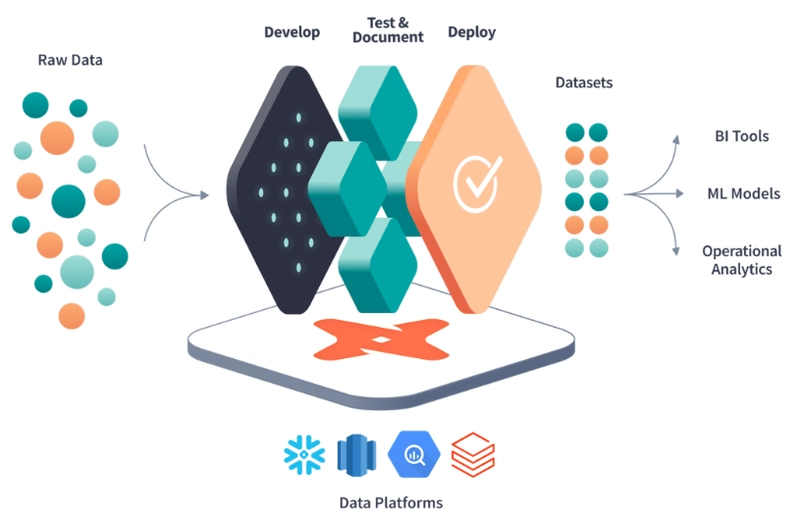
Data teams have shifted away from traditional on-premise warehouses and hand-written SQL pipelines toward cloud data platforms such as Snowflake, BigQuery, Redshift, and Databricks. Alongside this infrastructure change came a new role: analytics engineer, someone who focuses on transforming raw warehouse data into clean, reliable, analytics-ready models.
One of the most influential tools supporting this transformation-first approach is dbt (data build tool). dbt allows teams to define transformations in SQL, test data quality, document models, and manage dependencies between datasets.
As dbt usage grew across companies and industries, users started encountering the same problems repeatedly:
- Writing logic to generate surrogate keys
- Performing date spine generation
- Pivoting and unpivoting tables
- Safely unioning many tables
- Creating reusable test patterns
- Working around warehouse-specific SQL differences
To solve these common needs in a standardized, community-maintained way, the dbt utils package was created.
This article explores:
- What dbt-utils is
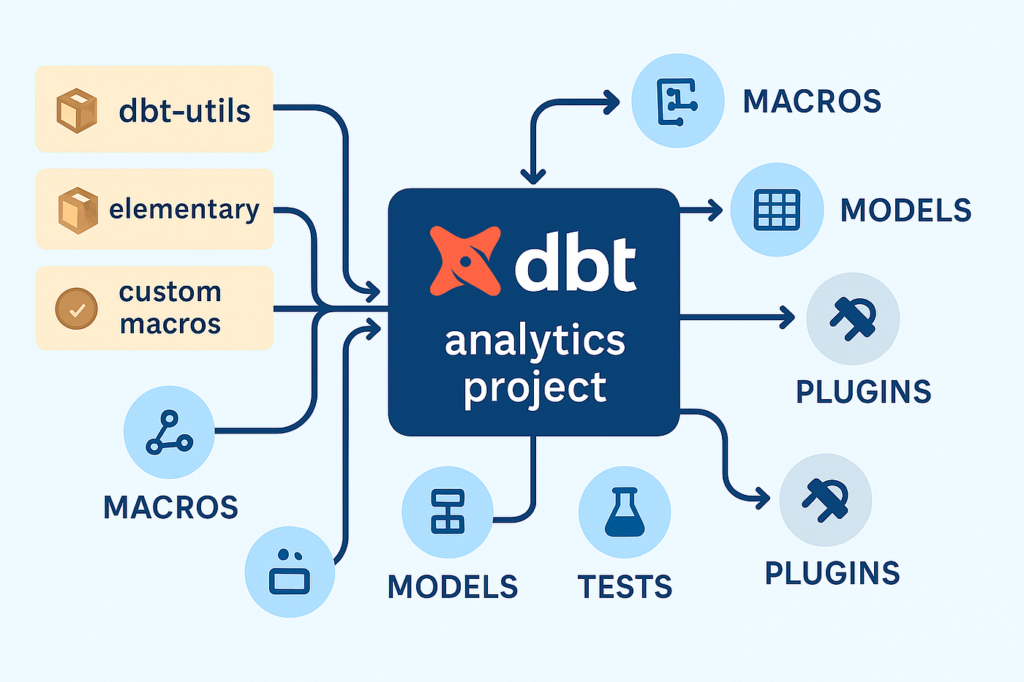
- How it fits into the dbt ecosystem
- The kinds of macros and tests it provides
- Why it has become essential for many production dbt projects
- Best practices for using it effectively
dbt Packages
Before diving into dbt-utils specifically, it is helpful to understand what a dbt package is.
What Is a dbt Package?
A dbt package is a reusable collection of:
- Macros
- Models
- Tests
- Seeds
- Documentation
Packages are distributed via GitHub and referenced in a dbt project’s packages.yml file. When you run:
dbt depsdbt downloads those packages into your project so you can use them as if they were native code.
Packages allow the community to:
- Share best practices
- Avoid reinventing the wheel
- Encapsulate tricky logic
- Provide cross-database abstractions
Some packages focus on specific warehouses, while others focus on testing, observability, or transformation patterns.
Where dbt-utils Fits
dbt utils is one of the oldest and most widely used community packages. It is maintained primarily by dbt Labs and contributors from across the analytics community.
Its goal is simple:
Provide general-purpose utility macros and tests that almost every dbt project can benefit from.
What Exactly Is dbt-utils?
dbt-utils is a collection of helper macros and generic tests designed to solve recurring transformation and modeling problems.
Instead of writing custom SQL every time you need to:
- Generate a date range
- Create a hashed key
- Union many tables
- Deduplicate records
- Pivot columns
- Validate relationships
…you can call a macro from dbt-utils and rely on well-tested, production-hardened logic.
Key Characteristics
dbt-utils is:
- Cross-warehouse aware – works across Snowflake, BigQuery, Redshift, Postgres, Databricks, and more
- Community-maintained – continuously improved
- Focused on reusability – designed to be generic and composable
- Production-ready – used by thousands of teams
Why dbt utils Exists
To appreciate its importance, consider what dbt projects looked like without shared utilities.
The Problem of Repetition
Every analytics team faced the same challenges:
- Creating surrogate keys from multiple columns
- Filling in missing dates for time-series analysis
- Deduplicating data from event streams
- Unioning dozens of similarly structured staging tables
- Writing boilerplate tests
Each team solved these problems independently, often with:
- Slightly different logic
- Bugs around null handling
- Warehouse-specific SQL quirks
- Performance issues
Over time, this led to:
- Technical debt
- Inconsistent patterns
- Hard-to-maintain codebases
The Need for Standardization
dbt utils emerged to:
- Codify common patterns
- Reduce copy-paste SQL
- Encourage best practices
- Accelerate new projects
- Improve reliability
In many organizations today, adding dbt-utils is one of the very first steps when initializing a new dbt repository.
Installing and Using dbt-utils
Using dbt-utils is straightforward.
Adding It to a Project
In your packages.yml:
packages:
  - package: dbt-labs/dbt_utils
    version: 1.1.1
Then run:
dbt depsOnce installed, you can reference its macros using the dbt_utils. namespace:
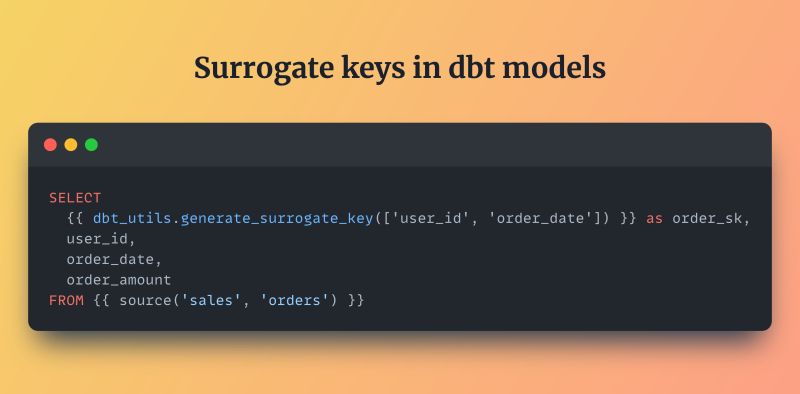
{{ dbt_utils.generate_surrogate_key(['user_id', 'order_id']) }}Categories of Functionality in dbt-utils
dbt-utils covers many transformation needs. Broadly, its utilities fall into several categories:
- Surrogate keys and hashing
- Date and time helpers
- Set operations and unions
- Pivoting and reshaping
- Deduplication and windowing
- Schema and metadata introspection
- Generic tests
- SQL portability helpers
Let’s explore each in detail.
Surrogate Keys and Hashing
The Need for Surrogate Keys
In analytics models, we often want a stable primary key:
- To join fact and dimension tables
- To enforce uniqueness
- To simplify downstream usage
Source systems may not provide a single natural key, or the key might be composite across many columns.
generate_surrogate_key
One of the most famous macros in dbt-utils is:
generate_surrogate_keyIt takes a list of columns and produces a hashed value, handling:
- Nulls consistently
- Type casting
- Database-specific syntax
This avoids subtle bugs where:
"1" || nullbehaves differently across warehouses- Hashing functions vary
Why This Matters
Using a standardized surrogate key macro ensures:
- Consistency across models
- Safer joins
- Easier debugging
- Reduced duplicated logic
Date and Time Utilities
Time-series modeling is extremely common in analytics:
- Daily revenue
- Monthly active users
- Retention curves
- Forecasting
date_spine
The date_spine macro generates a continuous series of dates between two endpoints.
Typical use cases:
- Filling gaps in reporting
- Building calendar tables
- Ensuring all dates appear in dashboards
Without it, teams often write complex recursive SQL or warehouse-specific generators.
Business Value
Date utilities help:
- Avoid broken charts
- Support consistent time-based analysis
- Simplify metric definitions
Set Operations and Union Helpers
The Challenge of Unioning Tables
It is common to have many tables with the same schema:
- Daily partitions
- Regional datasets
- Historical snapshots
- Sharded event tables
Manually writing:
select * from table_1
union all
select * from table_2
union all
...
does not scale well.
union_relations
The union_relations macro accepts a list of relations and:
- Aligns columns
- Adds missing columns as null
- Produces a single unioned result
This is invaluable for:
- Staging data from multiple sources
- Merging legacy systems
- Consolidating environments
Pivoting and Reshaping Data
Pivoting in Analytics
Analytics models often require pivoting:
- Turning rows into columns
- Aggregating metrics by category
- Building wide fact tables
SQL pivot syntax varies widely by warehouse.
dbt-utils Pivot Macros
dbt-utils provides macros to:
- Generate pivot statements
- Handle dynamic sets of values
- Remain warehouse-agnostic
Why It’s Important
These utilities:
- Reduce vendor lock-in
- Make transformations easier to read
- Encourage modular design
Deduplication and Windowing Patterns
The Reality of Messy Data
Source systems frequently send:
- Duplicate events
- Late-arriving records
- Updates to previous rows
Analytics teams must:
- Keep the latest record
- Remove duplicates
- Rank rows within partitions
dbt-utils Helpers
Macros such as deduplicate encapsulate:
- Partitioning logic
- Ordering
- Window functions
This avoids rewriting similar window queries in dozens of models.
Schema and Metadata Introspection
Dynamic Modeling
Sometimes you need to:
- Loop through columns
- Discover table schemas
- Build models dynamically
- Compare relations
dbt-utils exposes macros that interact with dbt’s internal graph and warehouse metadata.
This enables:
- Generic models
- Automated audits
- Schema comparisons
- Environment checks
Generic Tests in dbt-utils
Testing is a core part of dbt philosophy.
Built-In dbt Tests
dbt includes:
uniquenot_nullrelationshipsaccepted_values
These cover basic constraints.
dbt-utils Expands Testing
dbt-utils adds more advanced generic tests, such as:
- Equality between two relations
- Cardinality checks
- Expression-based validations
- Recency tests
- Mutually exclusive ranges
Why These Matter
Stronger tests lead to:
- Higher data trust
- Faster incident detection
- More confidence in dashboards
- Better SLAs with stakeholders
Cross-Warehouse Portability
One of dbt-utils’ most strategic benefits is abstraction.
Different warehouses:
- Hash strings differently
- Handle null concatenation differently
- Use different date functions
- Support different pivot syntax
dbt-utils hides these differences behind macros.
This makes:
- Migrating warehouses easier
- Writing portable models possible
- Multi-platform projects manageable
Organizational Impact of Using dbt-utils
Beyond technical convenience, dbt-utils has major organizational benefits.
Faster Development
Analytics engineers spend less time:
- Googling SQL tricks
- Debugging edge cases
- Writing boilerplate
They can focus on:
- Business logic
- Metrics
- Data modeling
Standardization Across Teams
Shared utilities lead to:
- Consistent patterns
- Easier onboarding
- Code reviews that focus on intent rather than syntax
- Lower maintenance costs
Improved Reliability
Well-tested macros reduce:
- Production incidents
- Subtle bugs
- Warehouse-specific failures
Best Practices for Using dbt-utils
Treat It as a Foundation, Not a Crutch
Use dbt-utils for common patterns, but still:
- Understand what the macro does
- Review the generated SQL
- Avoid blindly stacking macros
Pin Versions
Always specify a version in packages.yml so upgrades are controlled and predictable.
Combine with Your Own Utilities
Many teams create an internal company_utils package:
- Built on top of dbt-utils
- Encapsulating organization-specific patterns
Read the Documentation
dbt utils evolves, and new macros appear over time. Staying current helps teams adopt better approaches.
When You Might Not Need dbt-utils
While widely useful, dbt-utils is not mandatory in every scenario.
You might use fewer macros if:
- Your project is extremely small
- You rely heavily on warehouse-specific features
- Your transformations are very simple
However, most production-scale dbt projects eventually benefit from it.
The Future of dbt-utils and Community Packages
As dbt adoption grows, the ecosystem of packages continues to expand:
- Metrics layers
- Observability tools
- Data quality frameworks
- Industry-specific models
dbt-utils remains a cornerstone often the first dependency teams install.
Its continued development reflects a broader trend:
Analytics engineering is maturing, and reusable community standards are becoming the norm rather than the exception.
Conclusion
dbt utils is far more than a convenience library. It represents years of community experience distilled into a single package:
- It reduces duplicated work
- Encourages best practices
- Improves data quality
- Simplifies cross-warehouse development
- Accelerates analytics projects
For modern data teams building transformations in dbt, dbt-utils is often considered essential infrastructure, akin to utility libraries that underpin application development in other programming ecosystems.