Modern analytics engineering relies heavily on clean, consistent, and well-modeled data. When building dimensional models, fact tables, or slowly changing dimensions (SCDs), one recurring challenge is creating stable and deterministic unique identifiers—especially when your source systems don’t provide a natural primary key.
This is where surrogate keys come in.
In the dbt ecosystem, one of the most widely used helpers for this purpose is:
dbt_utils.surrogate_key
This macro, provided by the popular dbt-utils package allows analytics engineers to create reproducible hashed keys from one or more columns, ensuring uniqueness and stability across transformations and environments.
In this in-depth article, we’ll explore:
- What surrogate keys are and why they matter
- What
dbt_utils.surrogate_keydoes - How it works internally
- Installation and setup
- Practical examples
- Use cases in dimensional modeling
- Handling null values
- Performance considerations
- Best practices
- Common mistakes
- Migration tips
- Alternatives and newer macros
- Real-world modeling scenarios
Whether you’re new to dbt or already building complex warehouses, this guide will help you confidently use surrogate keys in production-grade analytics pipelines.
What Is a Surrogate Key?
A surrogate key is an artificially generated identifier used to uniquely represent a record in a table.
Unlike natural keys (such as email addresses, order numbers, or customer IDs from a source system), surrogate keys:
- Have no business meaning
- Are generated inside the warehouse
- Remain stable even if source attributes change
- Are often integers or hashes
- Are commonly used as primary keys in dimension tables
Why Not Just Use Natural Keys?
Natural keys can be problematic because:
- They may change over time
- They can be composite (multiple columns)
- Different systems may represent the same entity differently
- They may not be globally unique
- They can be long strings, hurting performance
Surrogate keys solve these problems by creating a single, consistent identifier for analytics models.
Surrogate Keys in Analytics Engineering
In analytics engineering, surrogate keys are especially important when:
- Building star schemas
- Creating fact and dimension tables
- Implementing Slowly Changing Dimensions (SCD Type 2)
- Joining across transformed models
- Standardizing identifiers across systems
Because dbt models are SQL-based transformations rather than ingestion tools, surrogate keys are often created during modeling—making dbt macros ideal for the job.
What Is dbt_utils.surrogate_key?
dbt_utils.surrogate_key is a macro from the dbt-utils package that:
Generates a hashed surrogate key from a list of columns.
It:
- Concatenates multiple fields
- Handles null values
- Applies a hashing function (like MD5)
- Produces a deterministic string
- Works across most warehouses
The resulting hash can be used as:
- A primary key
- A foreign key
- A stable join column
- A dimension identifier
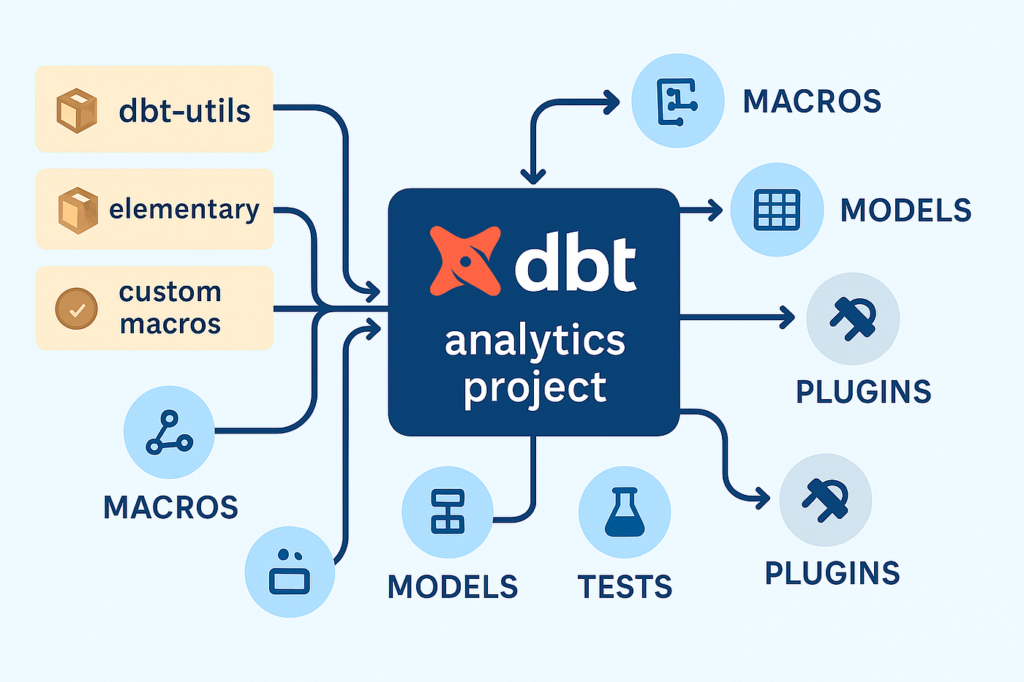
About the dbt-utils Package
dbt-utils is one of the most widely adopted community packages in dbt. It provides:
- Generic tests
- SQL helpers
- Schema utilities
- Common modeling macros
- Cross-database compatibility helpers
surrogate_key is among its most famous macros and is frequently used in dimensional modeling.
Installing dbt utils
Before using dbt_utils.surrogate_key You need to install the package.
In your packages.yml file:
packages:
  - package: dbt-labs/dbt_utils
    version: [">=1.0.0", "<2.0.0"]
dbt depsBasic Syntax of dbt_utils.surrogate_key
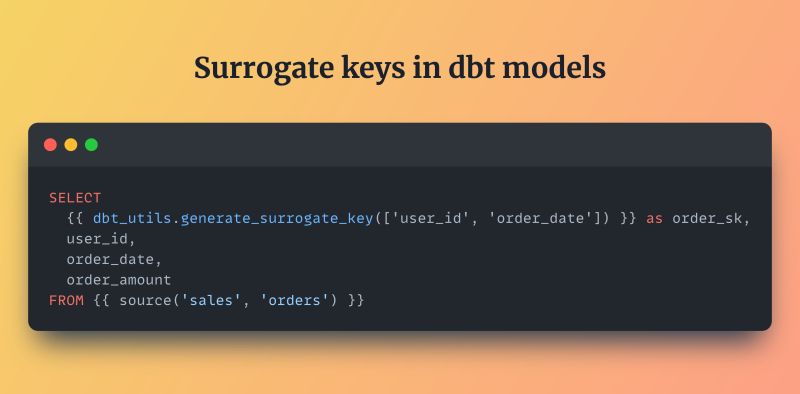
The macro is typically called like this:
{{ dbt_utils.surrogate_key(['column_a', 'column_b']) }}You include it in a SELECT statement to create a new column:
select
    {{ dbt_utils.surrogate_key(['customer_id', 'country_code']) }} as customer_key,
    customer_id,
    country_code,
    name
from source_table
This generates a hashed string that uniquely represents the combination of customer_id and country_code.
How Does the Macro Work Internally?
While the exact implementation can vary by version, conceptually the macro:
- Casts all fields to strings
- Coalesces null values to a default token
- Concatenates values with a separator
- Applies a hash function
- Returns the hashed result
Why Hash Instead of Concatenation?
Hashing:
- Produces a fixed-length value
- Avoids extremely long composite keys
- Improves join consistency
- Reduces risk of delimiter collisions
- Works across databases
Handling Null Values
One of the most important features of dbt_utils.surrogate_key is its careful handling of nulls.
Without this, two rows:
(col1 = 'A', col2 = null)
(col1 = 'A', col2 = '')
might hash differently—or unpredictably—across databases.
The macro typically:
- Replaces null with a string token like
'__dbt__null__' - Ensures consistency across warehouses
- Prevents accidental key collisions
Creating Surrogate Keys for Dimension Tables
A very common pattern is to generate surrogate keys for dimensions.
Example: Customer Dimension
select
    {{ dbt_utils.surrogate_key(['customer_id']) }} as customer_key,
    customer_id,
    first_name,
    last_name,
    email,
    created_at
from {{ ref('stg_customers') }}
This produces a stable customer_key that can be used in fact tables.
Composite Keys from Multiple Columns
Often, uniqueness depends on more than one field.
For example, a product might only be unique per store:
{{ dbt_utils.surrogate_key(['store_id', 'product_code']) }} as product_keyThis ensures:
- Same product in two stores → different key
- Same store and product → same key
Using Surrogate Keys in Fact Tables
Fact tables usually reference dimensions through surrogate keys.
Example: Orders Fact Table
select
    {{ dbt_utils.surrogate_key(['order_id']) }} as order_key,
    {{ dbt_utils.surrogate_key(['customer_id']) }} as customer_key,
    order_date,
    total_amount
from {{ ref('stg_orders') }}
This creates consistent keys that match the dimension models.
Slowly Changing Dimensions (SCD Type 2)
In SCD Type 2 modeling, you often need:
- A business key (natural key)
- A surrogate primary key
- Validity ranges (
valid_from,valid_to)
dbt_utils.surrogate_key is frequently used to create:
- The dimension row identifier
- Or a versioned key using attributes + timestamps
Example
{{ dbt_utils.surrogate_key([
    'customer_id',
    'valid_from'
]) }} as customer_version_key
Incremental Models and Key Stability
When using incremental models in dbt, surrogate keys must be:
- Deterministic
- Based only on stable columns
- Independent of load time
Never include:
current_timestamp- Row numbers
- Random values
Otherwise, dbt would generate new keys on every run—breaking joins and history.
Performance Considerations
Hashing columns is computationally more expensive than simple integers, but in most warehouses:
- MD5 or SHA hashing is fast
- Costs are negligible for dimension-sized tables
- Usually acceptable even for large fact tables
However, be mindful when:
- Hashing dozens of columns
- Processing billions of rows
- Using expensive functions repeatedly
In such cases:
- Limit to necessary fields
- Materialize models instead of views
- Avoid recomputation when possible
Data Warehouse Compatibility
dbt_utils.surrogate_key is designed to work across:
- Snowflake
- BigQuery
- Redshift
- Postgres
- Databricks
- Synapse
It abstracts away database-specific syntax for:
- Casting
- Hashing
- Concatenation
That portability is one reason it’s so popular.
Common Mistakes
Including Volatile Columns
Avoid:
updated_atload_timestamprow_number()
These will change the hash every run.
Using Different Logic Across Models
If your dimension uses:
{{ dbt_utils.surrogate_key(['customer_id']) }}But your fact table uses:
{{ dbt_utils.surrogate_key(['customer_id', 'country']) }}The keys will never match.
Always standardize.
Forgetting to Install the Package
Trying to call the macro without installing dbt-utils will result in compilation errors.
Replacing Nulls Manually
Let the macro handle nulls unless you have a very specific reason not to.
Testing Surrogate Keys in dbt
Add generic tests in schema.yml:
models:
  - name: dim_customers
    columns:
      - name: customer_key
        tests:
          - not_null
          - unique
This ensures:
- No missing keys
- No collisions in your dimension
Evolution: generate_surrogate_key Macro
In newer versions of dbt-utils, the macro:
generate_surrogate_key
is becoming the preferred replacement for surrogate_key.
It behaves similarly but offers:
- Clearer naming
- Improved null handling
- SHA-based hashing in some warehouses
- Better configurability
Example:
{{ dbt_utils.generate_surrogate_key(['customer_id']) }}Real-World Modeling Scenario
Imagine an ecommerce warehouse:
Sources
- Shopify orders
- CRM customers
- Marketing leads
Each system uses different identifiers.
In staging
You normalize:
- Phone
- External IDs
In dimensions
{{ dbt_utils.surrogate_key(['normalized_email']) }} as person_keyNow:
- Orders
- Campaign interactions
- Support tickets
can all join to the same person dimension—regardless of source.
Why Analytics Teams Love This Macro
dbt_utils.surrogate_key is popular because it:
- Removes boilerplate SQL
- Prevents subtle bugs
- Encourages consistent modeling
- Works everywhere
- Is easy to read
- Supports dimensional best practices
- Integrates perfectly with dbt workflows
It’s a small macro but foundational to many mature analytics stacks.
Conclusion
Surrogate keys are one of the cornerstones of high-quality analytics models, and dbt_utils.surrogate_key has become the de-facto standard for generating them in dbt projects.
By:
- Hashing stable business fields
- Handling nulls safely
- Remaining deterministic across runs
- Working across warehouses
- Supporting dimensional modeling
This macro enables reliable joins, historical tracking, and scalable analytics architectures.